 By Samuel
As WooCommerce stores expand into multiple warehouses or retail outlets, inventory complexity increases quickly. Manual tracking methods fail under rising order volumes and shifting regional demand patterns. Without structured location-based management, stock discrepancies and fulfillment delays become frequent operational challenges.
Understanding how WooCommerce multi store locations improve stock control begins with structured inventory management. WooCommerce multi store locations allow businesses to manage stock separately across multiple warehouses within one setup. This improves stock control through real-time tracking, location-based allocation, accurate routing, and smarter replenishment planning.
Continue reading to learn practical strategies for managing inventory across multiple WooCommerce locations effectively. Discover how location-based stock control reduces overselling and improves operational efficiency. Explore how multi-location management supports scalable, long-term business growth.
Why Stock Control Becomes Difficult in Growing WooCommerce Stores?
Growing WooCommerce stores often struggle with stock control as operations expand across warehouses and regions. Simple systems no longer handle complex inventory flows and higher-order volumes. Without a clear structure, small tracking issues quickly grow into costly operational problems.
Overselling Due to Shared Stock Pools
Many growing stores rely on one shared stock pool across every warehouse and sales channel. When teams sell from the same quantity without location limits, numbers drop inaccurately, and confusion spreads. Staff cannot see real availability per warehouse, so customers order items that specific locations no longer carry.
Manual Stock Adjustments Across Warehouses
Store managers often update stock levels manually for each warehouse after daily sales reports. This process takes time and increases the risk of typing errors or missed updates. When teams adjust quantities separately, mismatched numbers appear and create confusion across fulfillment and purchasing decisions.
Lack of Visibility Into Location-Level Inventory
Many stores fail to monitor inventory at each warehouse with clear and simple dashboards. Teams struggle to track how WooCommerce multi store locations manage stock separately without unified visibility tools. Without location-level insights, managers cannot balance quantities or move products between warehouses efficiently.
Delayed Fulfillment Due to Stock Confusion
Order processing slows down when teams cannot confirm which warehouse actually holds available stock. Staff spend extra time checking quantities across systems instead of preparing shipments quickly. This confusion leads to shipping delays, frustrated customers, and unnecessary backorders that damage brand trust.
Poor Regional Demand Planning
Growing stores often overlook regional buying trends when they manage inventory from one view. Without location-based data, managers cannot predict which products sell faster in specific areas. Poor planning causes excess stock in slow regions and shortages where demand rises quickly.
How WooCommerce Multi Store Locations Improve Stock Control?
Managing inventory across multiple physical locations is one of the biggest challenges for growing e-commerce businesses. WooCommerce Multi Store Locations functionality transforms stock control from a guessing game into a precision operation. By distributing inventory strategically and tracking it in real-time, businesses can eliminate overselling, optimize fulfillment, and make data-driven inventory decisions.
Real-Time Stock Accuracy Per Location
The foundation of effective multi-location stock control is live inventory tracking. When a customer places an order, stock is immediately deducted from the specific warehouse or retail location fulfilling that order, not from a vague centralized pool.
Key benefits:
- Live stock deduction by warehouse: Inventory updates instantly upon order confirmation.
- Elimination of overselling: Prevents selling products that exist in your system but are physically unavailable.
- Accurate stock visibility: Customers and staff see precise availability per location.
- Reduced cancellation rates: Orders are placed against actual, verified stock levels.
Quick Takeaway:
- Prevents stock mismatches between physical and digital records
- Keeps inventory synchronized across all sales channels
- Improves checkout accuracy and customer satisfaction
This real-time accuracy is crucial during high-traffic periods like flash sales or holiday seasons when inventory moves rapidly across multiple locations.
Location-Based Inventory Allocation
Strategic inventory allocation ensures each location carries stock aligned with regional demand patterns. Rather than maintaining identical inventory at every warehouse, smart distribution prevents both overstock and understock situations.
Strategic advantages:
- Demand forecasting by region: Stock popular items heavily where they sell best.
- Avoiding overstock: Prevents capital from being tied up in slow-moving inventory.
- Better inventory turnover: Products flow faster when positioned near demand centers.
- Balanced stock distribution: Reduces the risk of location-specific stockouts
Inventory allocation, stock distribution, demand forecasting, and stock balancing. By analyzing sales velocity per region, businesses can position inventory where it’s most likely to sell, improving cash flow and reducing storage costs.
Smarter Order Routing & Fulfillment Control
Multi-location WooCommerce setups enable intelligent order routing, automatically assigning orders to the optimal fulfillment location based on stock availability and proximity.
Operational improvements:
- Assign orders to specific locations: Route orders based on stock levels and business rules.
- Ship from nearest warehouse: Reduce shipping costs and delivery times
- Reduce split shipments: Consolidate orders to single locations when possible
- Faster fulfillment: Shorter distances mean quicker processing and delivery
Why this directly improves stock control: Stock deductions happen at the correct location, maintaining accurate records across your network. This eliminates warehouse confusion about which location should fulfill which order and provides operational clarity for your fulfillment team.
Per-Location Low Stock Alerts & Replenishment Planning
Effective stock control requires proactive monitoring. Warehouse-level low stock notifications ensure you reorder before stockouts occur, not after.
Alert capabilities:
- Safety stock per location: Set minimum thresholds tailored to each location’s demand.
- Better restocking timing: Receive alerts when inventory hits reorder points.
- Supplier coordination: Plan purchase orders based on location-specific needs.
- Lead time tracking: Account for supplier delivery times in reorder calculations.
- Preventing regional stockouts: Ensure high-demand areas never run out of critical stock.
These granular alerts prevent the “out of sight, out of mind” problem where remote locations suffer stockouts while headquarters remains unaware.
Centralized Dashboard & Reduced Human Error
A unified inventory dashboard provides complete visibility while maintaining location-level detail. This centralized approach dramatically reduces operational mistakes.
Dashboard features:
- Unified inventory visibility: See all locations in one interface.
- Clear stock breakdown by location: Instantly identify where inventory resides.
- Role-based management: Limit staff access to relevant locations only.
- Reporting clarity: Generate comprehensive or location-specific reports
Critical insight: Stock control isn’t just about tracking numbers, it’s about reducing human error. When staff can clearly see which location holds which inventory, picking mistakes, shipping errors, and inventory discrepancies decrease significantly.
Location-Level Reporting & Inventory Intelligence
Data-driven stock control requires granular reporting. Multi-location WooCommerce setups provide insights that single-location stores cannot match.
Reporting capabilities:
- Reports per warehouse/store: Analyze performance by physical location
- Fast-moving products per region: Identify regional preferences and trends
- Dead stock detection: Spot slow-moving inventory before it becomes a liability
- Internal stock transfers: Optimize inventory by moving stock between locations
These insights enable continuous optimization of your inventory strategy, ensuring capital is invested in products that move, not those that sit.
Different Advanced Stock Control Scenarios
Advanced stock control scenarios help growing WooCommerce stores manage complex inventory situations across multiple locations effectively. These scenarios go beyond basic tracking and support better order accuracy and planning. Clear systems help teams reduce confusion, protect revenue, and maintain smooth operations.
Variable Products Across Multiple Locations
Variable products include different sizes, colors, or styles stored across separate warehouses or stores. Each variation may have different stock levels depending on local demand and supply. Managing variations per location helps prevent selling unavailable options and improves accuracy during checkout.
Backorders Per Location
Backorders per location allow stores to accept orders even when specific warehouses run out. One location may restock faster, while another still waits for supplier delivery. Location-based backorders prevent global stock confusion and keep purchasing decisions clear and controlled.
Click & Collect (BOPIS) Stock Reservation
Click and collect systems let customers reserve items at nearby physical store locations. When customers select pickup, the system deducts stock only from that specific store. Clear reservation control prevents double-selling and ensures staff prepare items without confusion.
Cart Splitting by Warehouse
Cart splitting by warehouse separates products in one order based on stock location. If items come from different warehouses, the system assigns each product correctly. This method ensures accurate stock deduction and supports smoother, faster fulfillment processes.
Returns Processed Per Location
Processing returns per location helps stores adjust stock correctly after customer returns arrive. Each warehouse updates its own inventory when items come back into stock. This control prevents mismatched quantities and supports better tracking of product conditions.
Seasonal Stock Redistribution
Seasonal stock redistribution moves products between warehouses based on regional demand changes. Managers shift inventory before peak seasons to prevent shortages in high-demand areas. This planning reduces excess stock and improves overall inventory balance.
When Should You Use Multi-Location Stock Control?
Growing WooCommerce businesses often reach a point where simple inventory systems no longer support daily operations. As order volume increases and storage locations expand, stock tracking becomes harder to manage. Clear signals show when multi-location stock control becomes necessary for stable growth.
Multi-warehouse operation
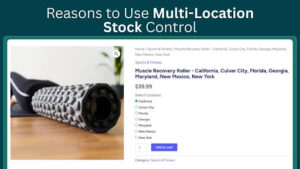
Managing stock across several warehouses creates tracking gaps without location-based inventory control systems. Each warehouse holds different quantities, and shared stock numbers quickly cause confusion. Multi-location management keeps warehouse data separate and improves overall stock accuracy.
Pickup is Available in Your Area
Local pickup requires accurate stock visibility at each physical store location. Customers expect items to be ready when they arrive for collection. Location-based stock control ensures the correct store reserves and prepares the product.
Experiencing Frequent Overselling
Frequent overselling signals that your inventory system lacks proper location separation. Shared stock pools allow customers to purchase items unavailable at specific warehouses. Multi-location control reduces errors and protects customer trust.
Manually Syncing Inventory
Manual stock syncing across warehouses increases errors and wastes valuable team time. Staff often update numbers late or miss important adjustments. Automated location-based tracking improves accuracy and simplifies daily operations.
Plan for Geographic Expansion
Expansion into new regions increases inventory complexity and operational pressure quickly. Different areas show unique demand patterns and stock movement speeds. Multi-location systems support structured growth without losing inventory control.
KPIs to Measure Improved Stock Control
Tracking clear performance indicators helps measure how well your stock control system performs across locations. These KPIs show where problems exist and where improvements deliver results. Monitoring them regularly supports better planning, smarter purchasing decisions, and steady operational growth over time.
- Oversell Rate: Measures how often customers purchase items that are no longer available in stock. A lower rate shows accurate tracking and stronger inventory control across locations.
- Stockout Frequency: Tracks how often products become unavailable at specific warehouse or store locations. Fewer stockouts mean better demand planning and balanced stock distribution.
- Inventory Turnover: Shows how quickly each location sells and replaces its available stock. Higher turnover usually signals healthy demand and efficient inventory movement.
- Fulfillment Time: Measures how long it takes to process and ship customer orders. Faster fulfillment indicates clearer stock visibility and smoother warehouse coordination.
- Order Split Rate: Tracks how often one orders ships from multiple warehouse locations. Lower split rates reduce shipping costs and improve stock allocation accuracy.
- Carrying Cost: Calculates the expense of storing inventory at each warehouse over time. Lower carrying costs reflect balanced stock levels and smarter purchasing decisions.
Final Thoughts
Strong inventory control shapes the success of any growing WooCommerce business. As operations expand across warehouses and regions, structured location-based management prevents costly mistakes and delays.
Businesses that understand how WooCommerce multi store locations improve stock control gain clearer visibility, smarter allocation, and faster fulfillment decisions.
Clear dashboards, real-time updates, and location-level insights turn inventory from a daily struggle into a strategic advantage. With the right system in place, growth becomes manageable, predictable, and far more profitable over time.